


StreamingСтриминг
Go live from your phone — and on YouTube, Twitch and TikTok at the same time.Эфир с телефона — и сразу на YouTube, Twitch и TikTok.
Android app · freeAndroid-приложение · бесплатно
Pickle Studio — mobile live streaming for creators, plus a messenger, a social network and Minecraft Bedrock multiplayer. One Android app, inspired by the Rick and Morty universe. Pickle Studio — мобильные эфиры для авторов, мессенджер, соцсеть и мультиплеер Minecraft Bedrock. Одно Android-приложение, вдохновлённое вселенной «Рика и Морти».
Why PickleПочему Pickle
Everything a gamer opens five different apps for — streams, chats, a feed and Minecraft with friends — in one place that all talks to each other.Всё, ради чего игрок открывает пять приложений — эфиры, чаты, лента и Minecraft с друзьями — в одном месте, где всё связано.
Go live from your phone — and on YouTube, Twitch and TikTok at the same time.Эфир с телефона — и сразу на YouTube, Twitch и TikTok.
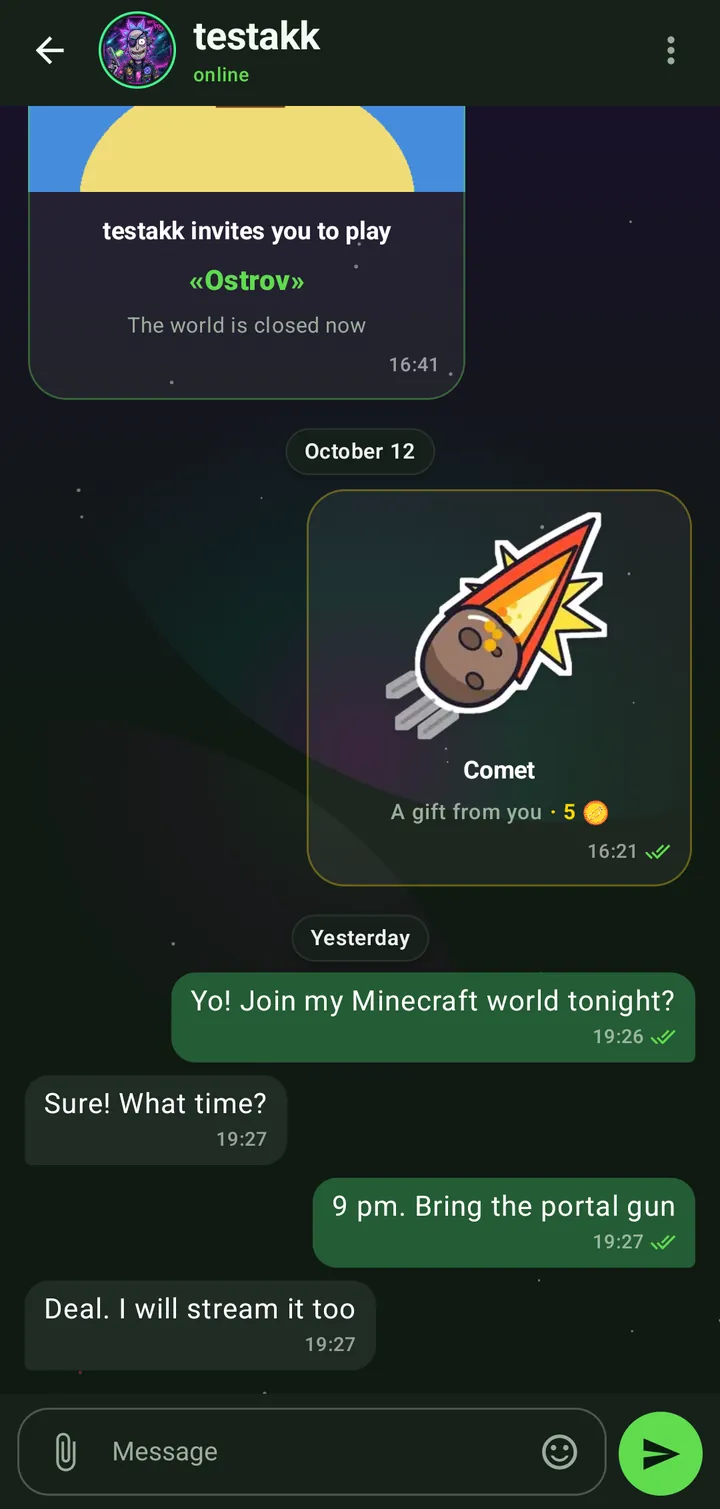
DMs, groups and communities — with “invite to game” cards.Личка, группы и сообщества — с карточками «Позвать в игру».
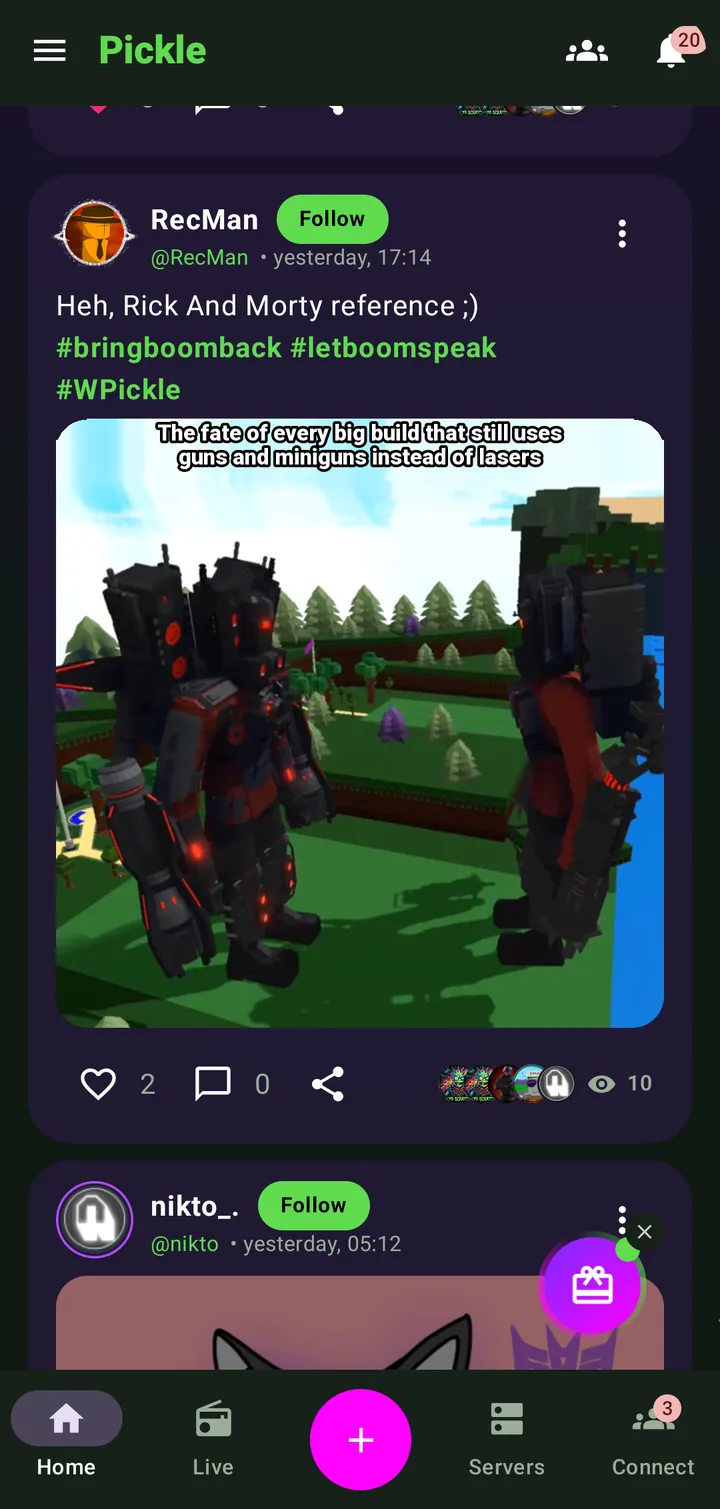
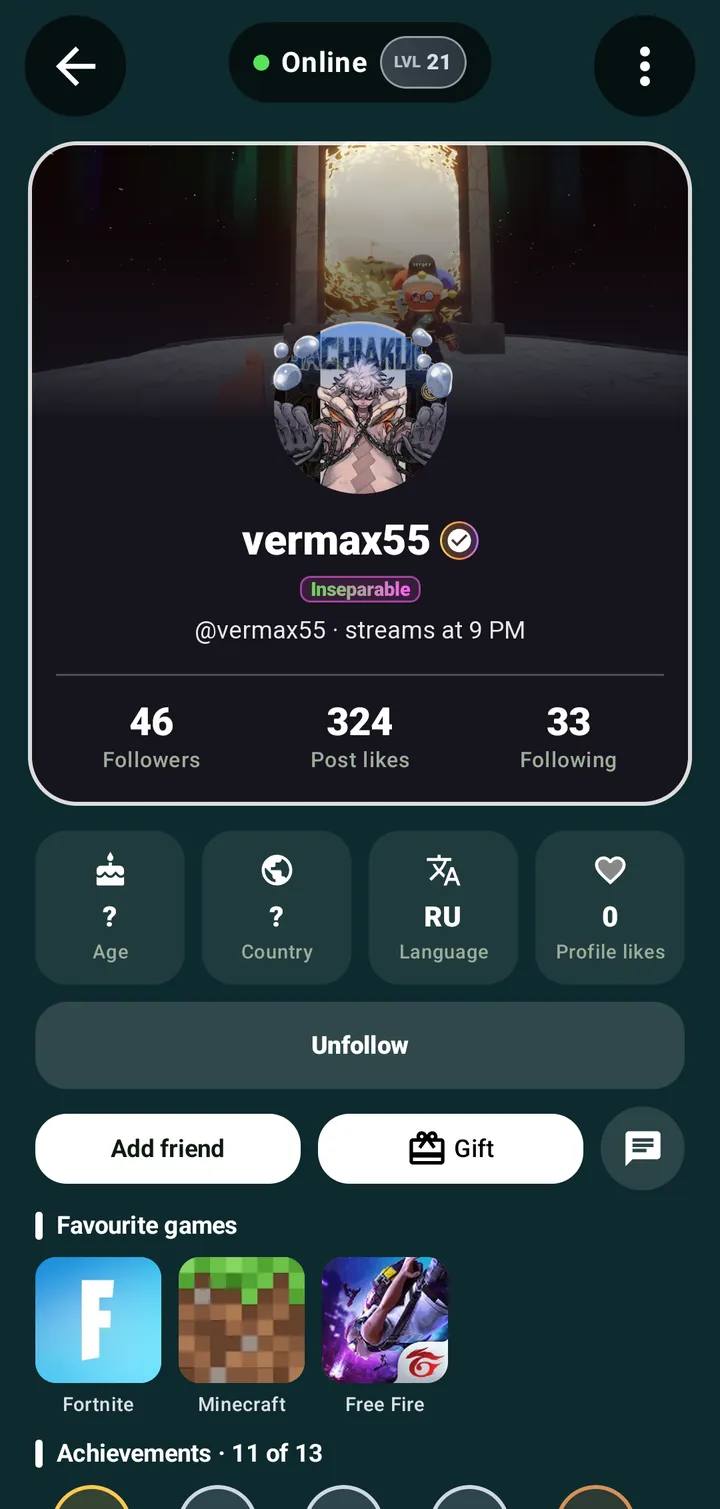
A feed with posts and hashtags, and a profile you build yourself.Лента с постами и хештегами и профиль, который ты собираешь сам.
Minecraft Bedrock with friends over the internet — no shared Wi-Fi.Minecraft Bedrock с друзьями через интернет — без общего Wi-Fi.
How it worksКак это работает
Download the APK from this site and open it — Android installs it in seconds.Скачай APK с сайта и открой его — Android установит за секунды.
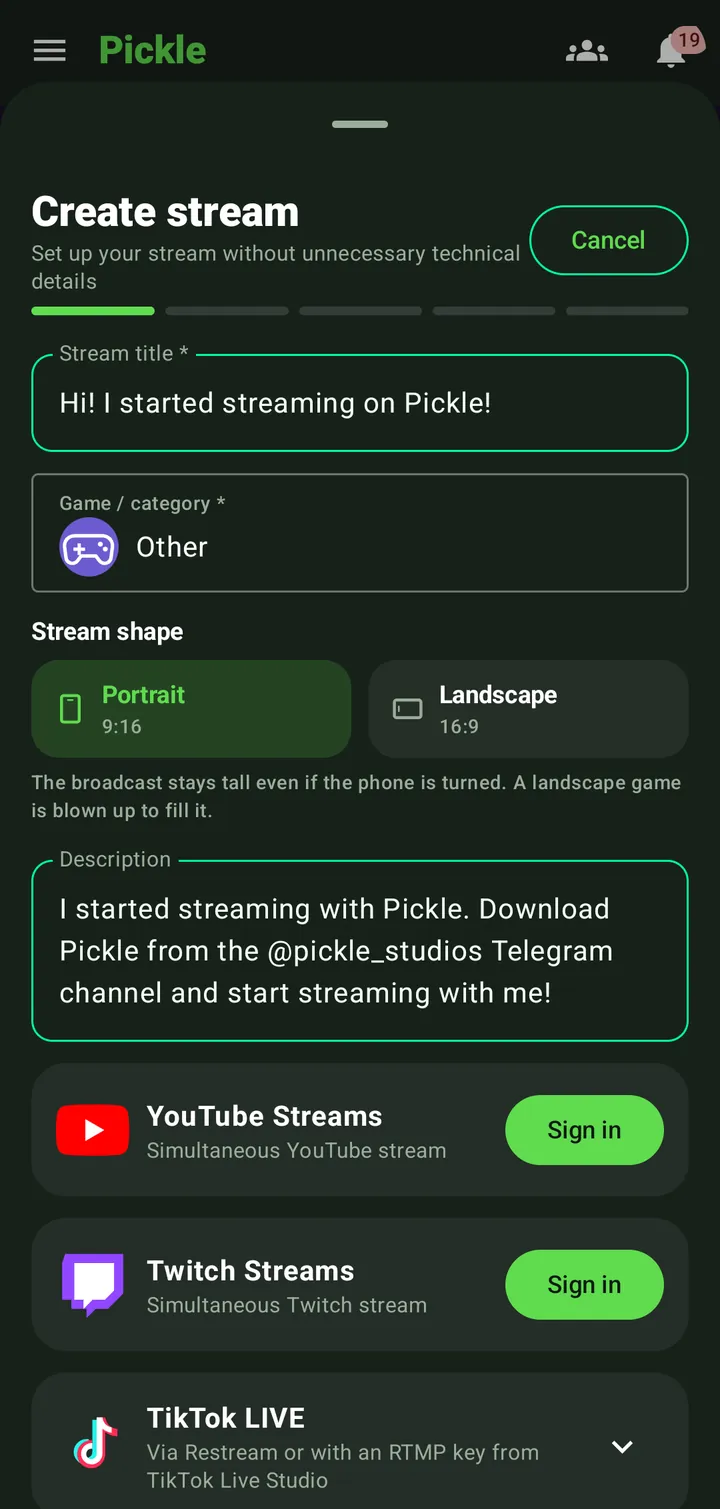
Title, game, format — and stream your screen or the camera. No PC, no OBS.Название, игра, формат — и стримь экран или камеру. Без ПК и OBS.
Connect YouTube, Twitch or TikTok and the same stream goes out to all of them.Подключи YouTube, Twitch или TikTok — и тот же эфир пойдёт на все площадки.
Start a LAN world in Minecraft Bedrock as usual.Запусти LAN-мир в Minecraft Bedrock как обычно.
Name it, pick a theme, optionally set a password — Pickle connects the game automatically.Назови, выбери тему, по желанию поставь пароль — Pickle подключит игру сам.
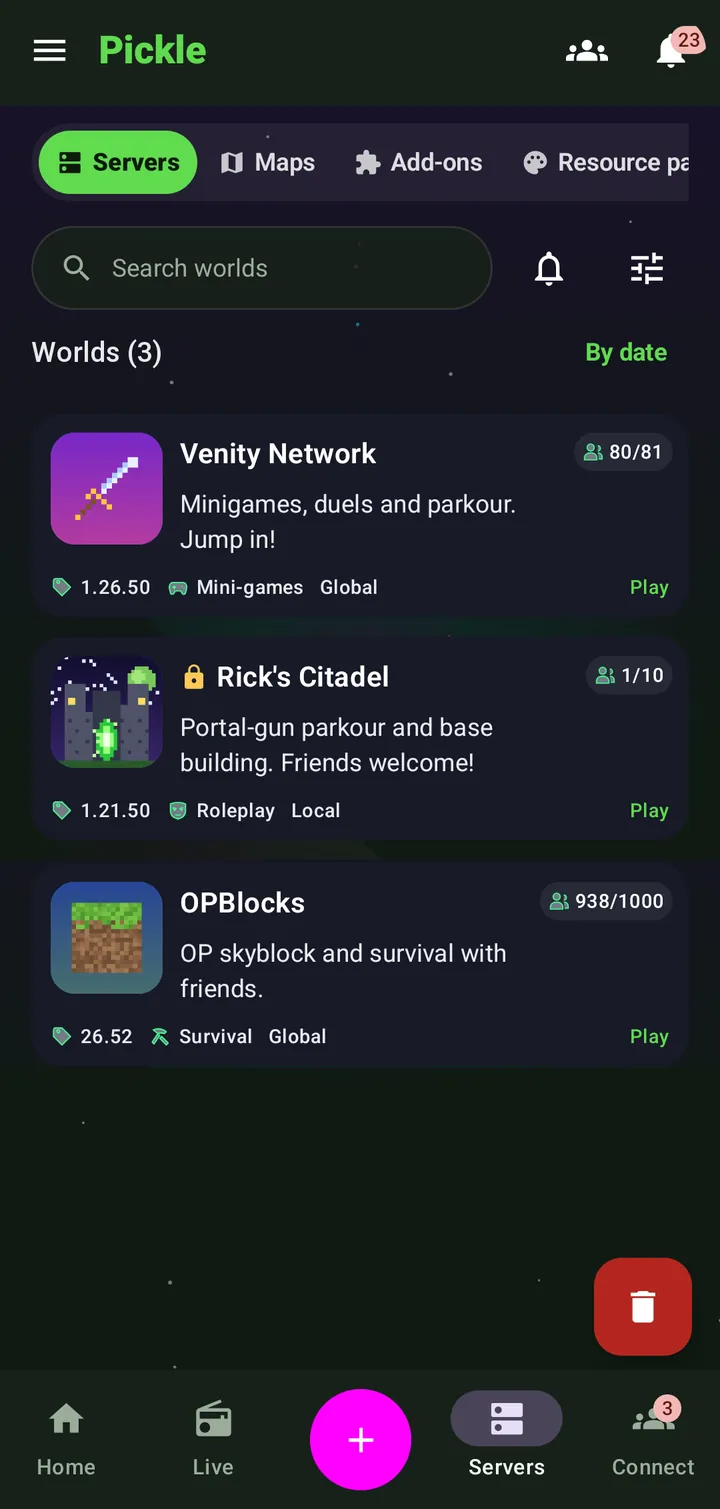
They see your world in the Servers list, or you send an “Invite to game” card in a DM.Они видят твой мир в списке серверов, а ты можешь отправить карточку «Позвать в игру» в личку.
Take a lookЗагляни внутрь
StreamingСтриминг
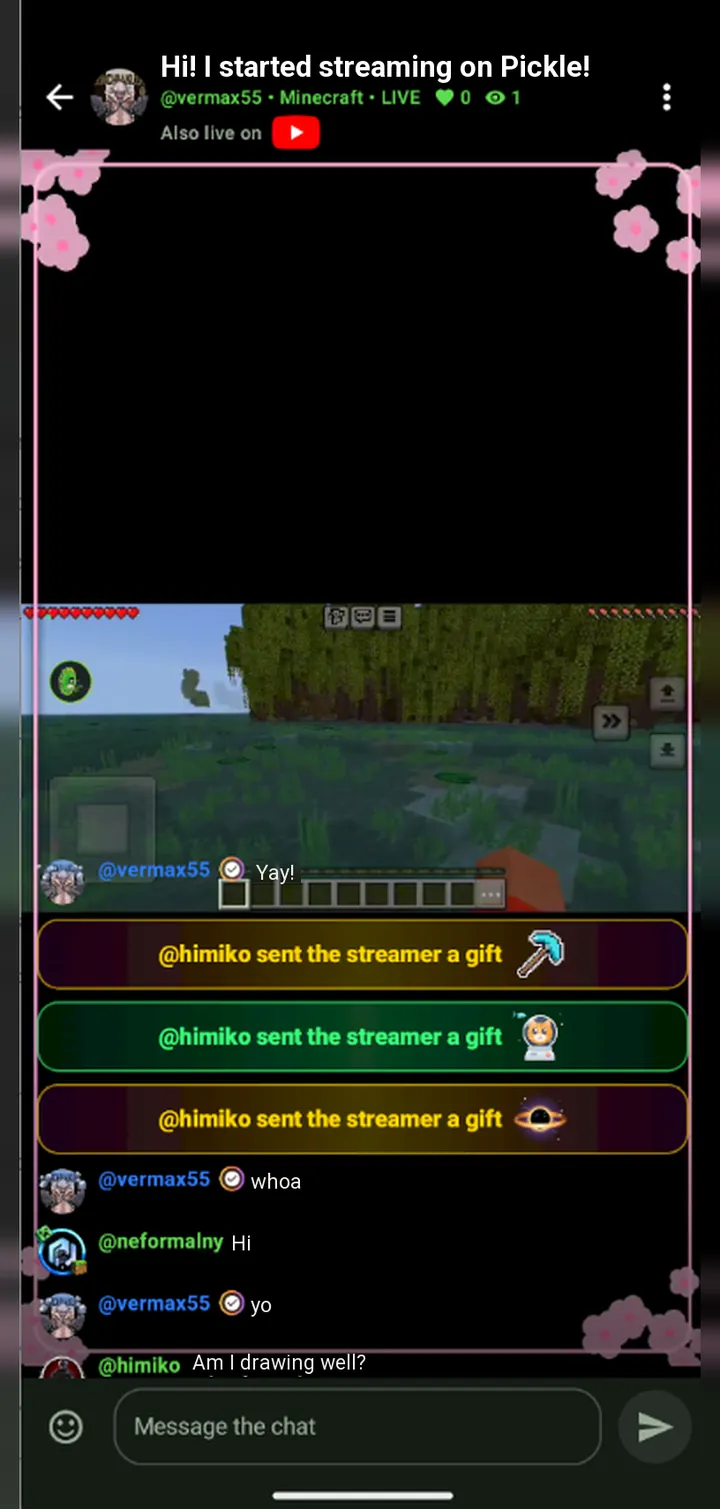
Chat, reactions and animated gifts on the stream itself. Your frame, your title, your game — and the same broadcast on other platforms.Чат, реакции и анимированные подарки прямо в эфире. Твоя рамка, название, игра — и тот же эфир на других площадках.
All streaming featuresВсе возможности эфировMessengerМессенджер
Message friends, run a community with roles and channels, and pull someone into your world with one card.Пиши друзьям, веди сообщество с ролями и каналами и зови в свой мир одной карточкой.
All messenger featuresВсё о мессенджереSocialСоцсеть
Posts, polls, GIFs and weekly hashtags — plus a profile with favourite games, a schedule, achievements and animated frames.Посты, опросы, GIF и хештеги недели — и профиль с любимыми играми, расписанием, достижениями и анимированными рамками.
All social featuresВсё о ленте и профилеMultiplayerМультиплеер
Local worlds of your friends and global Bedrock servers in one list, with passwords, themes and live online counters.Локальные миры друзей и глобальные серверы Bedrock в одном списке — с паролями, темами и живым онлайном.
All multiplayer featuresВсё о мультиплеере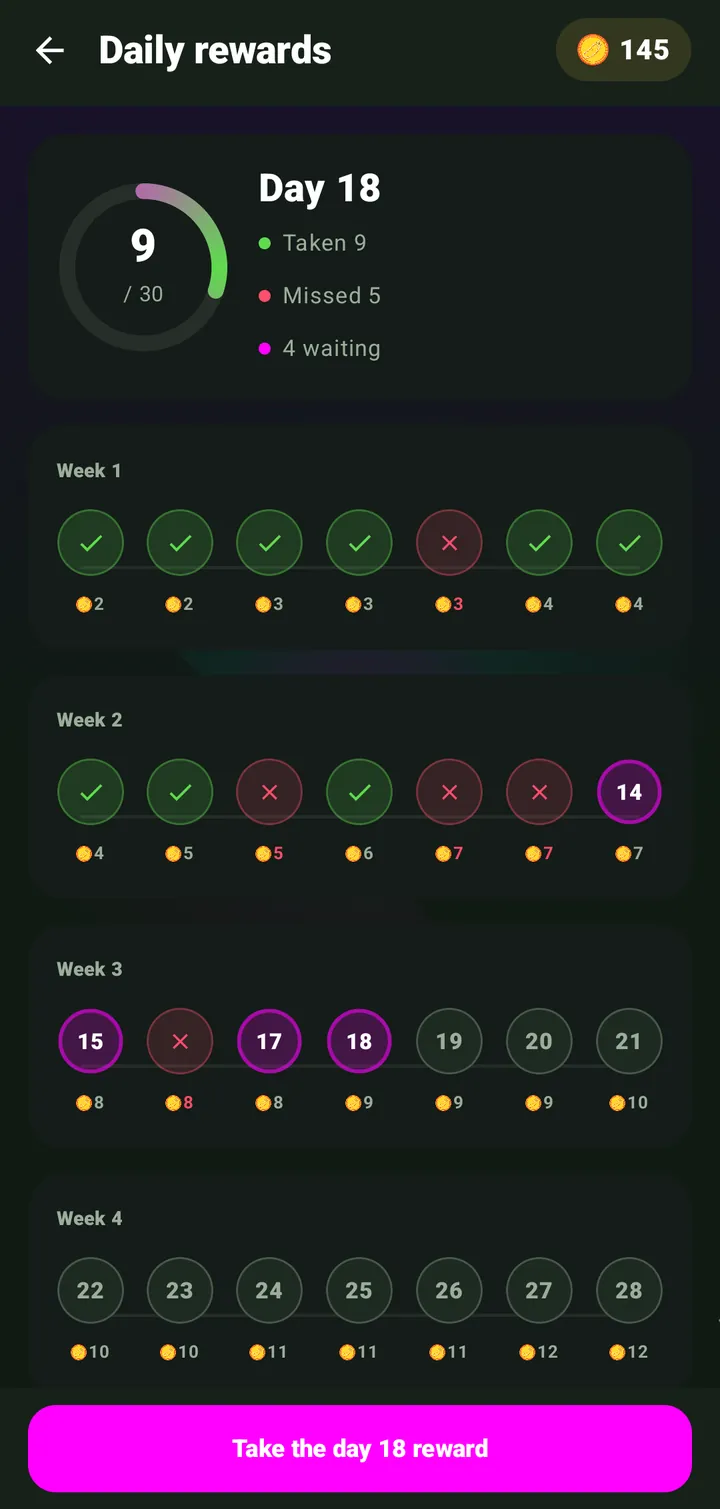
Levels & rewardsУровни и награды
Daily rewards, missions, achievements with titles and a shop of frames and effects — everything you do earns XP and Pickle Coin.Награды за вход, миссии, достижения с титулами и магазин рамок и эффектов — всё, что ты делаешь, приносит XP и Pickle Coin.
All rewardsВсе наградыFeaturesВозможности
One broadcast to Pickle, YouTube, Twitch and TikTok at once, with their chats merged into yours.Один эфир сразу в Pickle, на YouTube, Twitch и TikTok — чаты площадок собираются в твой.
Chat, pause, mic and world controls on top of any game.Чат, пауза, микрофон и мир — поверх любой игры.
Animated gifts for Pickle Coin — even anonymous ones.Анимированные подарки за Pickle Coin — даже анонимно.
Animated collectibles for your avatar, profile and streams — earn them or buy them with coins.Анимированные коллекционные рамки и эффекты для аватарки, профиля и эфиров — зарабатывай или покупай за коины.
A level badge by your name and presents on every level up.Значок уровня у ника и подарки на каждом новом уровне.
30 days of coins and a rare frame at the end of the month.30 дней коинов и редкая рамка в конце месяца.
Record your screen, keep replays and clips in the Studio, save the last epic seconds with “Moment”, schedule streams and go live as a duo.Записывай экран, храни повторы и клипы в Студии, сохраняй эпичные секунды кнопкой «Момент», планируй эфиры и стримь вдвоём.
Roles, admins, bans, invite links and channel posts.Роли, админы, баны, ссылки-приглашения и посты каналов.
English, Russian and German — switch any time.Русский, английский и немецкий — переключай в любой момент.
One place for your communityОдно место для вашего сообщества
Publish posts with photos, videos, GIFs and polls, build your profile and share moments with the people who follow you. Reactions, comments, hashtags and creator discovery live in one focused space.
Публикуйте посты с фото, видео, GIF и опросами, развивайте профиль и делитесь моментами с подписчиками. Реакции, комментарии, хештеги и поиск авторов — в одном пространстве.
Start a mobile broadcast of your game or camera, choose a title and cover, follow audience activity and talk with viewers through a synchronized chat and a compact in-game overlay.
Запускайте трансляцию игры или камеры, выбирайте название и обложку, следите за активностью аудитории и общайтесь со зрителями через синхронизированный чат и компактный игровой оверлей.
When available and authorized by the user, Pickle can connect creator accounts from services such as YouTube, Twitch and TikTok to stream to them at the same time. Each connection is optional and can be disconnected at any time.
Когда функция доступна и разрешена пользователем, Pickle подключает аккаунты авторов в YouTube, Twitch и TikTok, чтобы вести эфир сразу туда. Каждое подключение добровольно и отключается в любой момент.
Message friends, join communities, follow creators and get notified when they go live. Pickle also helps friends find and join each other's Minecraft Bedrock worlds over the internet.
Переписывайтесь с друзьями, вступайте в сообщества, подписывайтесь на авторов и узнавайте о начале их эфиров. А ещё Pickle помогает друзьям находить миры Minecraft Bedrock друг друга и заходить в них через интернет.
Privacy controls, reporting, blocking and moderation tools help people manage their experience. Creators stay in control of connected accounts and stream settings.
Настройки конфиденциальности, жалобы, блокировка и инструменты модерации помогают управлять своей средой. Авторы сохраняют контроль над подключёнными аккаунтами и настройками трансляций.
DownloadСкачать
Free for Android. New builds are also posted in our Telegram channel.Бесплатно для Android. Новые сборки выходят и в нашем Telegram-канале.
Android may ask you to allow installing from this source — that is the normal prompt for an app outside the store.Android может попросить разрешить установку из этого источника — это обычный запрос для приложения не из магазина.
FAQ
The short version of what people ask most.Коротко о том, что спрашивают чаще всего.
All questionsВсе вопросыPickle is an Android app that puts a streaming platform, a messenger, a social feed and Minecraft Bedrock multiplayer in one place.
Go live straight from your phone, chat in DMs and communities, publish posts and join your friends' worlds over the internet — all in a cosmic universe inspired by Rick and Morty.
Pickle — Android-приложение, где в одном месте собраны стриминговая платформа, мессенджер, соцсеть и совместная игра в Minecraft Bedrock.
Запускай эфиры прямо с телефона, переписывайся в личке и сообществах, публикуй посты и заходи в миры друзей через интернет — всё в космической вселенной в духе «Рика и Морти».
Yes. Downloading the app, streaming, chatting and playing are free. The in-app currency, Pickle Coin, is earned through activity: daily rewards, missions, levels and events.
Да. Скачать приложение, стримить, общаться и играть можно бесплатно. Внутренняя валюта Pickle Coin зарабатывается активностью: ежедневными наградами, миссиями, уровнями и событиями.
Android phones and tablets running Android 7.0 or newer. There is no iPhone version yet.
На Android-смартфонах и планшетах с Android 7.0 и новее. Версии для iPhone пока нет.
Open the Download page on this site and tap the download button — you will get the APK of the latest build. Open it and Android will offer to install the app.
If the phone asks for permission to install from this source, allow it: that is the normal prompt for apps outside the store. New builds are also posted in our Telegram channel @pickle_studios.
Открой страницу «Скачать» на этом сайте и нажми кнопку загрузки — скачается APK-файл последней версии. Открой его, и Android предложит установить приложение.
Если телефон спросит разрешение на установку из этого источника — разреши: это обычный запрос для приложений не из магазина. Новые версии также выходят в нашем Telegram-канале @pickle_studios.
Russian, English and German. You can switch the language in the app settings at any time.
Русский, английский и немецкий. Язык меняется в настройках приложения в любой момент.
Tap “+” at the bottom of the screen and choose “Stream”. The wizard asks for a title, a game category and a format — vertical 9:16 or horizontal 16:9. You can stream your phone screen with a game or the camera. No PC or OBS needed.
Нажми «+» внизу экрана и выбери «Эфир». Мастер попросит название, категорию игры и формат — вертикальный 9:16 или горизонтальный 16:9. Стримить можно экран телефона с игрой или камеру. Компьютер и OBS не нужны.
CommunityСообщество
New builds, announcements and a place to talk to the team.Новые сборки, анонсы и место, где можно поговорить с командой.
DevelopersРазработчики
Tap to message us on Telegram.Нажми, чтобы написать нам в Telegram.
Optional YouTube integrationНеобязательная интеграция с YouTube
Pickle works without a YouTube account. Access starts only after you choose “Connect YouTube” and approve Google’s consent screen.Pickle работает без аккаунта YouTube. Доступ начинается только после выбора «Подключить YouTube» и подтверждения на экране согласия Google.
Your YouTube channel ID, title and avatar; the authorization and refresh token; and data for broadcasts, streams and live chat needed for features you request.ID, название и аватар вашего YouTube-канала; токены авторизации и обновления; данные эфиров, потоков и чата, необходимые для запрошенных вами функций.
When you tap “Go live to YouTube” in the app, Pickle calls the YouTube Data API to: create a live broadcast and a matching live stream on your channel and bind them (liveBroadcasts.insert, liveStreams.insert, liveBroadcasts.bind); set the title, description, privacy status and “made for kids” flag you chose (liveBroadcasts.update); upload the custom thumbnail you selected (thumbnails.set); read and, when you use a moderation action, delete live chat messages (liveChatMessages.list, liveChatMessages.delete); transition the broadcast to live and then complete it when you end the stream (liveBroadcasts.transition); and, once when you first connect, clear the channel’s legacy video watermark if you enable that setting (watermarks.unset). No action happens unless you trigger it from the Pickle UI.При нажатии «Начать эфир на YouTube» Pickle вызывает YouTube Data API, чтобы: создать эфир и соответствующий поток на вашем канале и связать их (liveBroadcasts.insert, liveStreams.insert, liveBroadcasts.bind); задать выбранные вами название, описание, статус приватности и отметку «для детей» (liveBroadcasts.update); загрузить выбранную обложку (thumbnails.set); читать и, при вашем модераторском действии, удалять сообщения чата (liveChatMessages.list, liveChatMessages.delete); перевести эфир в статус «в эфире», а затем завершить его при остановке трансляции (liveBroadcasts.transition); и один раз при первом подключении снять устаревший водяной знак канала, если вы включили эту настройку (watermarks.unset). Ничего не выполняется без вашего действия в интерфейсе Pickle.
youtube.readonly cannot create, configure, start or stop a broadcast, cannot set the stream’s privacy or “made for kids” status, cannot upload a thumbnail, and cannot delete a live chat message — every one of these is a core, user-visible function of Pickle’s “Go live to YouTube” and chat-moderation features. youtube.upload only covers uploading pre-recorded videos and does not cover live broadcasts, live streams or live chat at all. The YouTube Data API does not offer a scope narrower than youtube / youtube.force-ssl that still permits managing live broadcasts and moderating live chat, so this is the minimum scope that supports the features described in card 02.youtube.readonly не позволяет создавать, настраивать, запускать и останавливать эфир, задавать приватность или отметку «для детей», загружать обложку и удалять сообщения чата — а это основные, видимые пользователю функции «Начать эфир на YouTube» и модерации чата в Pickle. youtube.upload охватывает только загрузку готовых видео и не относится к эфирам, потокам и чату. В YouTube Data API нет более узкой области, чем youtube / youtube.force-ssl, которая по-прежнему позволяла бы управлять эфирами и модерировать чат — поэтому это минимальная область, поддерживающая функции из карточки 02.
Pickle does not sell Google API data or use it for advertising, and only acts on your channel when you trigger a specific action in the Pickle UI. You can disconnect YouTube in Pickle or revoke access in Google Security Settings at any time; disconnecting deletes the stored token immediately. Channel data is refreshed from YouTube at least every 24 hours, YouTube chat is deleted after 30 days, and revoked access is detected and all YouTube data deleted within 24 hours.Pickle не продаёт данные Google API, не использует их для рекламы и действует на вашем канале только при вашем действии в интерфейсе Pickle. YouTube можно отключить в Pickle или в настройках безопасности Google в любое время; при отключении сохранённый токен удаляется немедленно. Данные канала обновляются из YouTube не реже раза в 24 часа, чат YouTube удаляется через 30 дней, а отзыв доступа обнаруживается и все данные YouTube удаляются в течение 24 часов.
Safety & transparencyБезопасность и прозрачность
Moderation, reports, privacy settings — and rules that are open to everyone.Модерация, жалобы, настройки приватности — и правила, открытые для всех.
Free on Android. Install Pickle, go live, call your friends into your world.Бесплатно на Android. Ставь Pickle, запускай эфир, зови друзей в свой мир.


